 Beast
Beast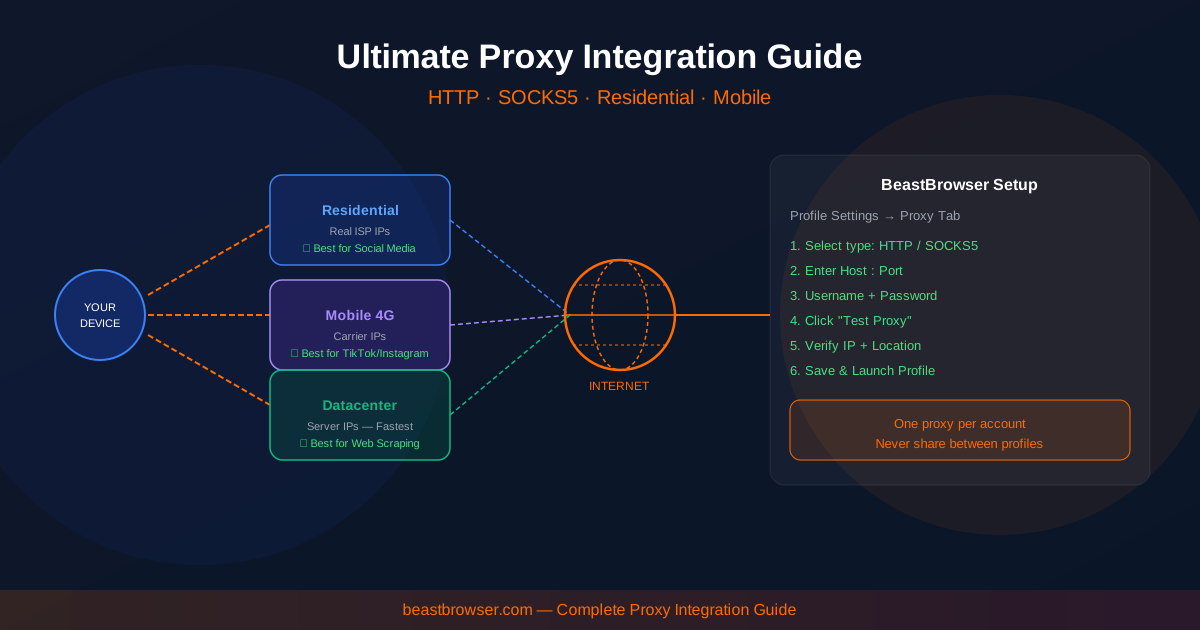
Buyers argue “SOCKS5 vs HTTP” as if the letters were a ranking. They are protocols. What platforms score is the IP reputation and whether that IP matches the browser you launched. A dirty residential SOCKS5 will lose to a clean HTTP ISP proxy. This article maps protocol, IP type, and multi-profile hygiene so each BeastBrowser row gets a network that fits the job.
If you only remember one sentence: assign a proxy per profile, then align timezone, language, and WebRTC with that country. Everything else is picking the right pool for ads, shops, research, or Android-style traffic.
Protocol: HTTP/HTTPS vs SOCKS5
HTTP/HTTPS proxies understand web requests. They are common, easy to debug, and fine for most Chromium traffic. SOCKS5 is a lower-level tunnel. It can carry more than HTTP and is popular when tools speak SOCKS natively. BeastBrowser’s proxy manager accepts both. If a provider gives you a host, port, username, and password, paste them on the profile and Launch. Do not mix two proxies on one profile “for failover” unless the product supports it — split brains look like fraud.
Health checks matter more than the acronym. Latency spikes and dead ports are how you launch an ads account onto a blackhole and then blame the fingerprint engine. Keep status next to the profile list. Replace dying IPs before you spend.
IP type: datacenter, residential, ISP, mobile
Datacenter IPs are cheap and fast. Many ad and social surfaces distrust them. Use them for low-risk research or internal tools, not as the default for Facebook spend or Amazon Seller Central.
Residential IPs come from consumer ISPs (or pools that look like them). They are the default for media buying when quality is real. ISP / static residential sits in the middle: datacenter-fast, ISP-branded. Teams like them for long-lived ad accounts that need a sticky address.
Mobile / 4G IPs rotate through carrier NATs. Social apps and some airdrop tasks prefer them. They are usually slower and more expensive. Put them on profiles that actually need mobile reputation — not on every row because a sales page said “4G.”
Match the network to the fingerprint
A US residential proxy with an Asia timezone is a novelty shop. BeastBrowser identity settings should follow the proxy country: language, geolocation permission, and clock. WebRTC must not announce a different subnet than the proxy. If you change proxy geo, update the profile’s locale the same day. Sticky sessions beat rotating IPs for logins you will reuse; rotating links are for scraping-style public pages where you are not maintaining a logged-in identity.
Never share one IP across two high-risk stores or two spend ad accounts. The whole point of isolated profiles is a one-to-one map: profile, fingerprint, proxy, account. Agencies should document that map. “Whoever grabbed a proxy from the Slack dump” is how linking starts.
In-app store vs your own list
If you already buy from a trusted provider, import bulk and tag by geo. If you do not, the in-app store exists so you are not alt-tabbing through five dashboards. Either way, BeastBrowser is the assignment layer — the Profiles window should show US · SOCKS5 or DE · HTTP the way the homepage mockup does, so you Launch with eyes open.
A last operational habit: when a proxy dies, pause the profile before you hunt a replacement. Launching a warmed Facebook or Amazon session onto a new country without updating timezone is how “healthy” accounts look like travelers overnight. Swap the IP, match the locale, then Launch. Write the geo on the profile name so the next operator does not guess.
Read Proxy Integration for protocols and health checks, then download BeastBrowser and bind a proxy before the first login — not after a restriction email.